
CurbSmart Parent
NutriLink TechnologiesParenting
3.120.00 Reviews
- Version
- 4.2.1635
- Installs
- 10.00K
- Age Rating
- Everyone
Screenshots

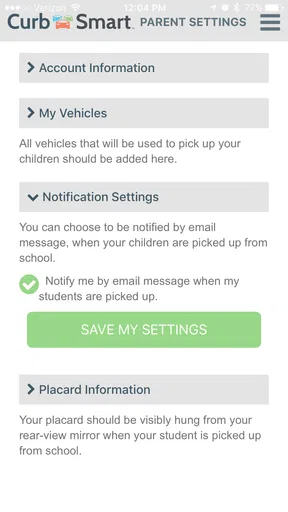
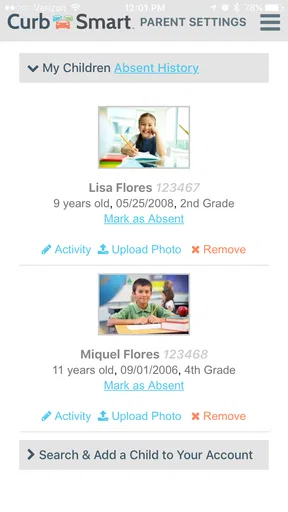
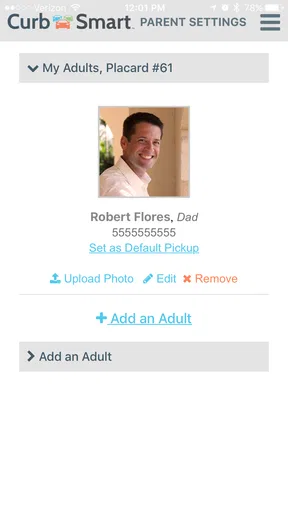
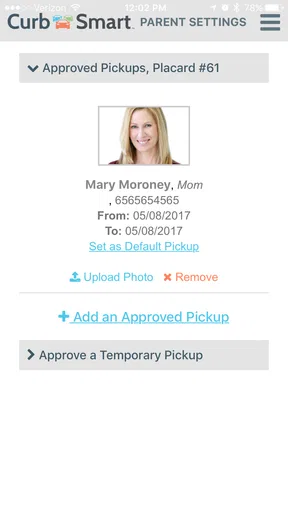
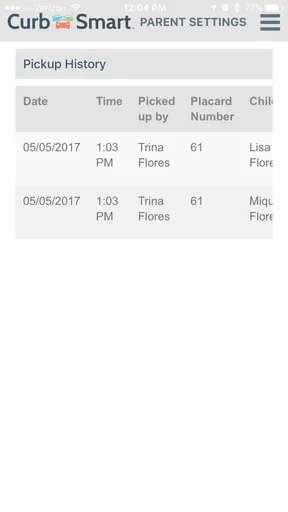
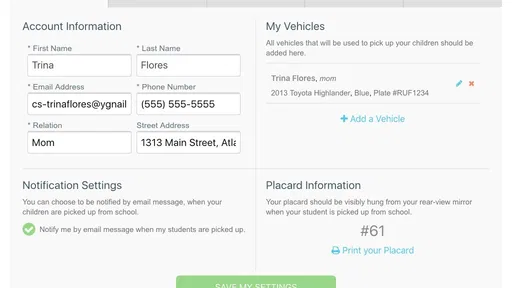
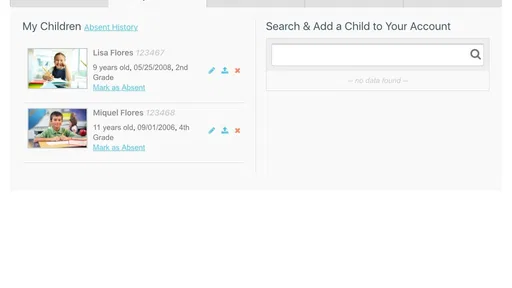
Our Review of CurbSmart Parent
 Analysis by Appyee
School pickup sounds simple until several adults, changing schedules, and a line of cars turn one ordinary afternoon into a coordination problem. I looked at CurbSmart Parent from that practical angle: not as a general parenting organizer, but as a focused tool for families who need a clearer way to handle after-school car pickup. Its purpose is narrow, and that is both its appeal and its main limitation.
In my experience, the app makes the most sense when a parent, another trusted adult, and school pickup routines overlap. Instead of relying entirely on last-minute messages, the household can use one dedicated place for the pickup process. That does not magically solve every school policy or transportation issue, but it can reduce the familiar “Who is getting them today?” confusion.
How CurbSmart Parent fits into a real pickup routine
Imagine a weekday when one parent is working late, another adult is available, and the child expects the usual car pickup. The useful part of a dedicated pickup app is that the arrangement can be treated as a routine rather than rebuilt through a chain of text messages every afternoon. I would use it before leaving home, check that the intended pickup plan is current, and then keep the phone available during the school run.
That workflow is especially helpful when the household has more than one regular driver. A grandparent, babysitter, or co-parent may need to participate without being involved in every other part of family life. A pickup-specific app keeps the conversation centered on the trip instead of mixing it with homework reminders, shopping lists, sports messages, and unrelated family chat.
The trade-off is that CurbSmart Parent is not a complete family management system. I would not choose it as my only tool for calendars, medical information, school announcements, or broad household planning. Its value comes from concentrating on the after-school handoff. Families looking for a large all-in-one parenting platform may find that scope too limited, while families with a recurring car-line problem may appreciate the focus.
One practical tip is to establish a household rule before depending on the app: everyone involved should know which person is responsible for checking the pickup arrangement and what to do if plans change. The app can support coordination, but it cannot replace a clear backup plan. That small agreement prevents the common mistake of assuming that every adult saw the same update at the same time.
Setting it up without blurring household boundaries
The first setup decision should be about responsibility, not convenience. Decide who needs to participate in pickup coordination and who only needs occasional information. A shared family device may be useful for a parent who stays at home, but it also means the household should be deliberate about which account is active before making changes. I would avoid casually handing the phone around while signed in if several adults use the same device.
That boundary matters because a pickup arrangement is tied to a particular child, day, and driver. A shared device can make access easier, yet it can also create confusion if one adult assumes another person has already handled the update. My recommendation is to keep a simple household convention: one person confirms the plan, another person can act as the backup, and both know how to contact each other outside the app if something goes wrong.
I would also test the routine on an ordinary day before using it during a rushed pickup. Open the app, review the relevant information, and make sure each participating adult understands what they are expected to do. This is less about discovering hidden complexity and more about avoiding a first-use problem when the school day has already ended and the car line is moving.
For families with children of different ages, separate the question of who is being picked up from the question of who is allowed to make changes. A teenager may understand the schedule, but that does not automatically mean they should manage the household’s pickup arrangements. The app’s Everyone content rating makes it broadly suitable from an age-label perspective, but an age label is not a substitute for family judgment about account access and responsibility.
That distinction is one of the most important points for shared-device households. The app may be appropriate to have on a family phone, while the actual coordination should remain with the adults responsible for transportation. I would treat the child as someone who needs a reliable pickup outcome, not necessarily as another administrator of the process.
Coordinating drivers when plans change
After-school schedules rarely stay perfectly fixed. A meeting runs late, a sibling’s activity ends at a different time, or the usual driver becomes unavailable. A focused pickup app is most useful when it gives the household a common routine for handling those changes. It is less useful if every participant continues to maintain a separate version of the plan in text messages, paper notes, and memory.
My preferred workflow would be to make the change as soon as it is known, then verify it with the person actually driving. That second step is important. A digital update can be easy to miss when someone is already walking to the car or dealing with another child. I would never treat the app as permission to use a phone while driving; the responsible adult should review and update arrangements while stationary.
A good household test is to rehearse one modest change, such as switching the pickup adult earlier in the day. Notice who checks the app, who confirms the switch, and what happens if the first driver does not respond. This reveals whether the family is using CurbSmart Parent as a shared coordination tool or merely adding another place where information might be overlooked.
There is also a useful distinction between planned changes and emergencies. For a planned change, the app can be part of the normal handoff. For an urgent situation, I would use the fastest direct communication method available and then update the pickup arrangement afterward if appropriate. That approach avoids putting too much pressure on a single app during a moment when speed matters more than record-keeping.
Compared with ordinary texting, the dedicated approach can feel cleaner because the purpose is obvious. Text messages are flexible, but they become difficult to scan when a conversation contains jokes, photos, unrelated questions, and several competing updates. Compared with a shared calendar, CurbSmart Parent is more directly centered on the car-pickup task, while a calendar may be better for seeing the entire family’s week. I would use the app for the handoff and a calendar for broader scheduling rather than forcing either tool to do both jobs.
Compared with a verbal arrangement, the app has the advantage of giving the household a repeatable digital reference. Verbal plans are fine when one parent always drives at the same time, but they become fragile when several adults rotate duties. The weakness is that every participant must actually use the chosen system. A paper note on the refrigerator may still be better for a grandparent who rarely uses smartphone apps, provided the arrangement is kept current.
Trust, age, and the limits of a pickup tool
Because this is a parenting app, trust is more important than novelty. I would recommend it to adults who already have an established right to collect the child and simply need a more organized way to coordinate. I would not use it to introduce an unfamiliar pickup person without separately following the school’s identification and authorization procedures.
The Everyone rating is reassuring for a household that wants the app available on a shared phone, but it should not be misunderstood as a statement that every child should independently manage transportation. The relevant question is maturity and role: is the person checking the app responsible for the child’s safe handoff, or are they only receiving information? Keeping those roles separate leads to fewer misunderstandings.
Another point I would explain to children is that an app-based plan can change. A child should know what to do if the expected car does not appear, rather than assuming that a digital arrangement is infallible. The family’s backup instructions—such as waiting in the school’s designated area and contacting a trusted adult—remain essential. CurbSmart Parent can support the adult side of the plan, but it should not be presented as the child’s only safety net.
Shared use also raises a simple privacy habit: do not leave the phone unlocked in a public place while displaying family scheduling information. That is sensible for any parenting app, especially when a device is passed between adults. I found that the strongest use case is a small, trusted circle with a clear purpose, not a broad group of people added merely because they might occasionally help.
The developer, NutriLink Technologies, positions this product around the after-school pickup problem, and the narrow focus is apparent in how I would evaluate it. I am not looking for entertainment, a reward system, or a large collection of parenting features here. I am looking for a dependable routine that makes the driver handoff easier to understand. If a family does not have a recurring car-pickup need, the app may feel unnecessary.
What the current app profile suggests for new users
CurbSmart Parent is free, which lowers the barrier to trying it with a household routine before deciding whether it deserves a permanent place on everyone’s phones. It has passed the early experimental stage as a product: the app was released on May 9, 2017, and the current version is 4.2.1635. It requires Android 5.1 or later, so compatibility with an older family phone is worth checking before assigning that device to pickup duty.
The app has reached over ten thousand installs, with an average rating of 3.1 from forty-eight ratings and twenty reviews. I read that overall reception as mixed rather than alarming. It suggests that the concept is useful to some families, but the experience may not feel equally smooth for everyone. I would test it with the adults who will actually use it instead of assuming that a promising idea automatically fits every school routine.
Those figures also put the app in perspective. It is not a broadly familiar household standard that every driver will already know. If a babysitter or relative is expected to participate, allow time to explain the workflow. The fewer people involved, the easier it is to keep the arrangement consistent; the more people involved, the more important it becomes to define who confirms changes.
For an older phone kept in a kitchen or used by a grandparent, the minimum operating-system requirement may be the first practical checkpoint. I would install it before the school day, sign in or configure the intended household arrangement while calm, and then observe how quickly the occasional driver can find the relevant pickup information. That test is more valuable than simply installing the app and assuming everyone will understand it.
I would also avoid judging it solely by whether it replaces every message. A successful routine may still involve a quick call or text when plans change suddenly. The real question is whether the app reduces repeated explanations and prevents the household from losing track of the active pickup plan. That is a modest goal, but for busy parents it can be worthwhile.
Who should use it, and who should choose something else?
I think CurbSmart Parent is best for a household with a predictable school car-line routine and at least two adults who sometimes share pickup responsibility. It is also a reasonable fit when one parent is the main organizer but needs another trusted adult to step in without reconstructing the entire plan from memory. The app’s focused purpose can be an advantage in those situations.
I would be more hesitant to recommend it to a family whose school uses a completely different pickup procedure, whose children usually walk or take a bus, or whose transportation changes constantly from day to day. In those cases, a general family calendar plus direct communication may be easier. If the family already has a reliable shared calendar and rarely experiences pickup confusion, adding a separate app could create duplication rather than clarity.
It may also be the wrong choice for a household that needs extensive scheduling, detailed reminders, or a broad communication hub. CurbSmart Parent should not be judged as a replacement for every parenting tool. Its strongest argument is specialization. If the family wants one place for meals, chores, appointments, schoolwork, and transportation, a wider family organizer may offer better value even if its pickup workflow is less focused.
One non-obvious trade-off is that specialization can improve attention while reducing flexibility. A dedicated pickup screen is easier to understand than a long family calendar when the only question is who is collecting the child. But if the pickup depends on several linked events—work shifts, sports practice, medical appointments, and sibling care—a broader calendar may show the cause of the change more clearly. I would choose based on whether the problem is handoff confusion or whole-family scheduling.
Another useful insight is that the app works best when it becomes part of a before-school habit, not a last-second rescue tool. Reviewing the arrangement in the morning gives the household time to catch conflicts. Opening it only after the bell rings leaves little room to fix a misunderstanding. That habit costs almost nothing and makes a focused app much more effective.
A third is that the app should have one accountable owner in the household, even when several adults can participate. Shared responsibility sounds fair, but in practice it can mean nobody checks the final plan. Assigning one person to make the daily confirmation, with another adult as backup, creates a clearer chain of responsibility without excluding other trusted drivers.
My household verdict
After looking at CurbSmart Parent as a real household tool, I see a useful but specialized option. It is not trying to be a complete parenting suite, and I would not pretend that it solves every transportation problem. Its appeal is the simple idea of giving after-school car pickup its own coordination space, which can be valuable when several adults share a child’s routine.
I would recommend trying it if your family regularly has pickup uncertainty, especially when a co-parent, grandparent, babysitter, or other trusted adult may take over. Start with a quiet test day, agree on who confirms changes, and keep a direct backup communication method. That setup makes the app part of a dependable process rather than the only thing standing between a child and a safe handoff.
I would skip it if your family has no regular car pickup, if your school’s process does not match the app’s purpose, or if another shared calendar already handles the situation without confusion. The mixed 3.1 average means I would approach it with realistic expectations, not assume universal polish. Still, because it is free and aimed at a specific everyday problem, it is easy enough to evaluate against your own routine.
My final view is cautiously positive: the app is most valuable when it replaces scattered pickup conversations with one agreed household habit. It earns its place when that narrow problem happens often enough to justify a dedicated tool. For families in that situation, CurbSmart Parent can make coordination more orderly; for everyone else, a normal calendar, a clear family rule, or a quick direct message may be the simpler answer.
Verdict
Strengths of CurbSmart Parent
- Simple pickup coordination helps reduce confusion after school or activities.
- Parents can receive timely updates about pickup status and changes.
- Useful for organizing approved pickup arrangements in one place.
- Can improve communication between schools, caregivers, and families.
- May reduce waiting time by making pickup schedules more predictable.
Limitations of CurbSmart Parent
- Availability and features may depend on the participating school or organization.
- Requires reliable internet access for live updates and notifications.
- Parents may need to keep contact and authorization details updated.
- Notification delays could cause confusion during busy pickup periods.
- Not useful if your child’s school or program does not support CurbSmart.
Similar Picks in This Category
View All
Family Space
Motorola Mobility LLC.3.9

شرطة الأطفال - مكالمة وهمية
Oub Apps4.1

Findmykids: Parental Control
LETEM LTD4.6

Pregnancy + | Tracker App
Philips Electronics UK Limited4.8

Policía de niños - para padres
Kids police4.7

Pregnancy App
Amila4.9
Frequently Asked Questions
What is CurbSmart Parent, and who is it designed for?
CurbSmart Parent is a transportation-management app designed to help parents or guardians coordinate and monitor student transportation. It is generally used alongside participating schools, districts, childcare providers, or transportation services. Before downloading, confirm that your organization supports CurbSmart, because the app’s usefulness and available features depend on an active account and the transportation program connected to your child.
How do I create an account and connect my child’s transportation details?
Account setup normally requires an invitation, registration link, or access code provided by the participating school or transportation organization. After signing in, parents may need to verify their contact information and add or confirm eligible students. The exact enrollment process can vary, so downloading the app alone may not provide access. Contact the school or transportation administrator if your child does not appear in the account.
What transportation updates can parents receive through the app?
Depending on the organization’s configuration, CurbSmart Parent may provide information such as pickup or drop-off details, transportation status, schedule changes, alerts, and notifications related to a student’s trip. Features can differ between schools and providers, and timing may depend on the data supplied by drivers or dispatchers. Parents should still follow official school instructions when an alert is delayed or unavailable.
Does CurbSmart Parent track my child’s location in real time?
The app may display transportation progress or trip-related updates when location and status information is enabled by the participating transportation provider. However, this should not automatically be interpreted as continuous, precise real-time tracking. Availability, accuracy, and update frequency depend on the service, driver equipment, network connection, and organization settings. Review the provider’s privacy information to understand what data is collected and shared.
What should I do if notifications, login, or transportation information is not working?
First, check that notifications are enabled for CurbSmart Parent, your phone has a reliable internet connection, and the app is updated to the latest version. Confirm that you are using the email or credentials associated with the transportation program. If information remains missing or incorrect, contact your school, district, or transportation provider, since many account and route issues must be corrected by an administrator rather than inside the app.
